
Allow Your Website to Display in MultiMoxx
To show your website inside device mockups, your site needs to allow embedding. Some websites block this by default for security reasons, but this can be adjusted with a few simple changes.
This guide walks you through how to allow your site to display properly in MultiMoxx.
Why This Is Needed
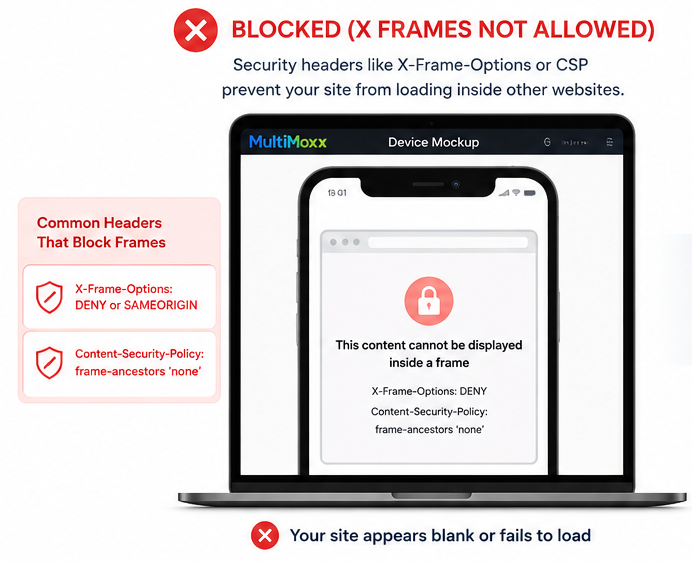
Modern websites often block being displayed inside other websites using security headers. The most common ones are:
- X-Frame-Options
- Content-Security-Policy (CSP)
If these are enabled, your site may appear blank or fail to load inside MultiMoxx.
What You Need to Do
To allow your website to display, you’ll need to:
- Install MultiMoxx Snap Chrome extension
- Remove or disable X-Frame-Options
- Update your Content Security Policy (CSP) to allow embedding
Option 1: Install MultiMoxx Snap for Chrome (Recommended)
Don’t have access to your website’s security settings? MultiMoxx Snap can help you display websites that normally block embedding in MultiMoxx Studio.
Install MultiMoxx Snap
- Visit the MultiMoxx Snap page in the Chrome Web Store.
- Click Add to Chrome.
- Click Add extension when Chrome asks for confirmation.
- Open MultiMoxx Snap from the Extensions icon in your Chrome toolbar.
- Turn on the option to Allow sites to display in MultiMoxx Studio.
- Approve the additional Chrome permission when prompted.
- Return to MultiMoxx Studio and reload your website.
Your website should now be able to display inside supported MultiMoxx device frames and presentations.
Why Does the Extension Need Permission?
Some websites send security headers such as X-Frame-Options and Content-Security-Policy (CSP) that tell Chrome not to display the website inside another webpage.
When you enable this optional feature, MultiMoxx Snap can remove those iframe restrictions when the website is being displayed inside MultiMoxx Studio.
This does not modify the actual website or change its server settings.
The Feature Is Optional
The embedding feature is turned off by default.
You only need to enable it if a website you’re trying to use in MultiMoxx Studio refuses to display.
You can turn the feature off again at any time from the MultiMoxx Snap extension.
Designed Specifically for MultiMoxx
The header override is limited to websites being embedded through MultiMoxx Studio. It is not intended to remove website security protections during your normal browsing.
MultiMoxx Snap’s standard screenshot and device-mockup features also work without enabling this additional permission.
Still Not Displaying?
Some websites use additional security measures or technical restrictions that can prevent them from functioning correctly when embedded.
If a website still won’t display, use MultiMoxx Snap to capture the page as a screenshot and send the capture directly to MultiMoxx Studio instead.
You’ll still be able to place the captured website inside devices and use MultiMoxx Studio’s presentation tools without requiring a live website embed.
Option 2: Quick Fix
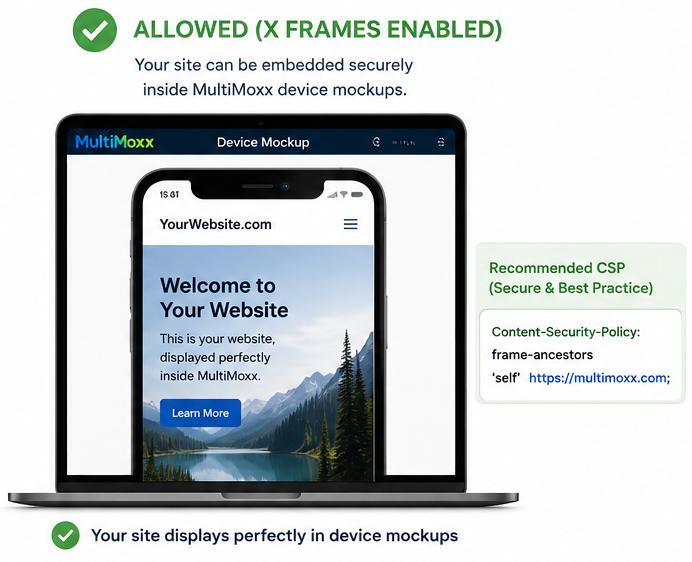
Allow embedding only on MultiMoxx (secure and recommended):
Content-Security-Policy:
frame-ancestors 'self' https://multimoxx.com;
This allows your website to be embedded on MultiMoxx while keeping protection elsewhere.
Option 3: Allow Embedding Anywhere
If you want your site to work everywhere:
Content-Security-Policy:
frame-ancestors *;
Note: This is less secure and not recommended for sensitive sites.
Remove X-Frame-Options
This header must be removed completely.
How to Make These Changes
If You Use Cloudflare (Easiest Method)
- Log into Cloudflare
- Go to Rules → Transform Rules
- Click “Modify Response Header”
- Add the following rules:
Rule 1:
- Header: X-Frame-Options
- Action: Remove
Rule 2:
- Header: Content-Security-Policy
- Action: Set
- Value: frame-ancestors ‘self’ https://multimoxx.com;
Save and deploy.
If You Use WordPress
Check the following:
- Security plugins (Wordfence, iThemes, etc.)
- Caching plugins (LiteSpeed, WP Rocket, etc.)
- Your theme or hosting panel
Look for settings related to:
- Clickjacking protection
- Security headers
Disable or modify them accordingly.
If You Have Access to .htaccess (Apache)
Header always unset X-Frame-Options
Header set Content-Security-Policy "frame-ancestors 'self' https://multimoxx.com"
If You Use Nginx
add_header Content-Security-Policy "frame-ancestors 'self' https://multimoxx.com";
proxy_hide_header X-Frame-Options;
After You Make Changes
- Clear your cache (Cloudflare and website cache)
- Reload MultiMoxx
- Your site should now display correctly
Troubleshooting
- Your hosting provider may be adding headers automatically
- A plugin may still be overriding your settings
- Try temporarily disabling security plugins
Important Notes
- These changes only work for websites you control
- Some third-party websites cannot be embedded
- This does not affect your SEO or normal site visitors
Need Help?
If you’re unsure how to make these changes, send this page to your developer or hosting provider and ask them to:
“Allow embedding on MultiMoxx by removing X-Frame-Options and setting frame-ancestors in the Content Security Policy.”
Once enabled, you’ll be able to create full, scrollable mockups of your website inside MultiMoxx.